

Technical SEO refers to website and server optimisations that help search engine spiders crawl and index your site more effectively. It’s about ensuring that your site is fast, secure, and easy for search engines to understand.
While the word “technical’ may scare a lot of people, I’m going to keep it super simple.
1. The Architecture of Crawlability
Before Google can rank your content, it has to find it. This is where Crawling and Indexing come in.
When you create a website it’s unknown to search engines, you have to submit it. For Google, you submit to Google Search Console, and for Bing, Bing Webmastter tools.
- Robots.txt: This is your site’s “instruction manual” for bots. It tells search engines which pages they can and cannot request from your site.
- XML Sitemaps: Think of this as a roadmap. It lists all your important pages, ensuring Google doesn’t miss anything during its crawl.
- Crawl Budget: Search engines only spends a certain amount of time on each site. By eliminating “dead ends” (404 errors) and redirecting old links, you ensure search engines spend their time on your most valuable pages.
2. Optimising Website Speed
Page speed has been a confirmed ranking factor for years. Users (and Google) are impatient; if your site takes more than 3 seconds to load, your bounce rate will skyrocket.
Core Web Vitals (CWV)
Google uses three specific metrics to measure user experience:
- LCP (Largest Contentful Paint): How fast the main content loads.
- FID (First Input Delay): how quickly the site responds to the first click.
- CLS (Cumulative Layout Shift): How stable the page is (no annoying jumping text).
You can test these by going to Pagespeed Insights and input your site’s URL.
How to improve website speed:
- Compress images (use WebP or Avif format).
- Minify CSS, JavaScript, and HTML.
- Use a Content Delivery Network (CDN) to serve content from servers closer to the user.
If you’re using WordPress, many plugins optimise speed automatically. You can install LiteSpeed or Jetpack
3. Mobile-First Indexing
We live in a mobile-first world. Google now predominantly uses the mobile version of a site’s content for indexing and ranking.
- Responsive Design: Your site should automatically adjust to any screen size. Elements on mobile must be stacked and fit the screen without pinching and zooming.
- Touch-Friendly: Buttons shouldn’t be too close together, and text should be legible without zooming.
4. Security and HTTPS
HTTPS is a lightweight ranking signal. Having an SSL certificate (the little padlock in the URL bar) ensures that data sent between the user and the server is encrypted.
Most hosting offers free SSL in their hosting plans.
5. Structured Data (Schema Markup)
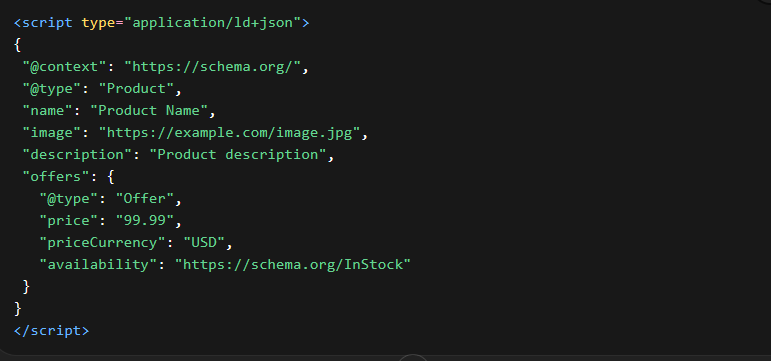
Schema markup is code you put on your website to help search engines return more informative results for users. It doesn’t “help” you rank higher in the traditional sense, but it creates Rich Snippets.
Rich snippets are displayed uniquely from other results. There are several types of rich snippets, including Recipe, Article, Organisation, and Product schemas. All these are created from their respective schemas,
If you have an online store, Schema allows Google to show the product name, description, price, images and ratings as a rich snippet.

You can create schema markup manually or use tools that automate everything for you. On WordPress, you can install the Yoast plugin.
Adding schema markup doesn’t guarantee rich snippets. Google may decide whether to show a rich snippet or not based on different ranking factors.
6. Managing Duplicate Content
Google hates seeing the same content on multiple URLs. It confuses the algorithm and splits your “ranking power.”
- Canonical Tags: Use
rel="canonical"to tell Google which version of a page is the original. This is useful especially for paginated pages that may show similar content. - 301 Redirects: If you move a page, use a permanent 301 redirect to send users and search bots to the new URL.
7. Optimising Code
Website code can hinder effective page crawling. Ensure your HTML page contents are visible to search bots. Avoid hiding or rendering important content with JavaScript.
While Google understands JavaScript, complex rendering mechanisms may affect how well search bots find content.
Summary Checklist
| Feature | Action Item |
| Site Speed | Aim for a Google PageSpeed Insights score of 90+ (Don’t stress much if it’s below) |
| Mobile | Ensure no horizontal scrolling on mobile devices. |
| Indexation | Check Google Search Console for “Indexed” vs “Excluded” pages. |
| Security | Ensure your site is 100% HTTPS. |
Conclusion
Technical SEO isn’t a “one and done” task. It requires regular audits to ensure that your site is crawlable and indexable.